This site uses third-party website tracking technologies to provide and continually improve our services, and to display advertisements according to users' interests. I agree and may revoke or change my consent at any time with effect for the future.
Every day, your IT team makes hundreds of access decisions, who gets in, what they can see, and which devices they're allowed to use. Most of those decisions are reactive, manual, and inconsistent. Conditional access systems flip that model. They automate security policies in real time, enforce access rules before a breach occurs, and help you stop treating every login as equally risky.
If you're managing a growing SaaS stack, distributed teams, or tightening compliance requirements, conditional access isn't optional anymore. It's the control layer that keeps your environment secure without slowing people down. This guide walks you through how it works, what policies matter most, and how to deploy it without disrupting your users.
What Is a Conditional Access System
Set Description and Core Purpose
A conditional access system evaluates context before granting access to applications, data, or resources. Instead of relying solely on static credentials, the entry point in 22% of breaches, it checks who is requesting access, from where, on what device, and under what conditions, then applies pre-defined access policies to allow, block, or challenge the request.
The core purpose is simple: reduce risk by making access decisions dynamic. An employee from Marketing would get different treatment than someone accessing the same app from Engineering. Conditional access systems make those distinctions automatically, at scale, without requiring manual intervention from your IT team.
How Conditional Access Works From Signal to Decision
Policy Evaluation Logic
Once signals are collected, the system evaluates them against your configured policies. Policies are structured as if-then rules: if a user is accessing a high-risk app from an unmanaged device, then require MFA and restrict data download. If an admin is logging in outside business hours, then block access unless they're on the VPN.
Most platforms process policies in a hierarchy. Explicit "block" rules take precedence over "allow" rules. If multiple policies apply to a single session, the most restrictive one wins. This layered logic ensures that security always defaults to the safest outcome.
User and Device Signals
Conditional access begins with signals and data points collected at the moment of login. These include user identity, group membership, location, and the application being accessed. Some systems also factor in real-time risk scores based on anomalous behavior, such as impossible travel or credential leaks detected on the dark web.
Enforcement Actions
After evaluation, the system enforces an action. Common enforcement actions include:
Allow: Grant full access with no additional requirements
Challenge: Require MFA, password reset, or terms of service acceptance
Block: Deny access entirely
Limit: Grant access but restrict permissions, such as view-only or no-download
Enforcement happens in real time. If a device falls out of compliance mid-session, some systems can revoke access immediately. This continuous verification model is what separates conditional access from legacy perimeter-based security.
Key Conditional Access Policies Every IT Team Needs
Block Legacy Authentication
Legacy authentication protocols such as IMAP, POP3, and basic authentication don't support MFA. Attackers exploit this by targeting older apps and bypassing modern security controls. A policy that blocks legacy authentication across all users and apps is one of the fastest ways to close a major security gap.
Require MFA for High-Risk Sign-Ins
Not every login needs MFA, but high-risk ones do. Use risk-based policies that trigger MFA when a user logs in from a new location, an unfamiliar device, or after multiple failed login attempts. This balances security with user experience. Your team isn't prompted for MFA every time they open Slack, but they are when something looks off.
Restrict Access by Device Compliance
Only allow access from devices that meet your security baseline: enrolled in MDM, running up-to-date OS versions, and encrypted. This policy is especially critical for apps that store sensitive data, like your HR system or financial tools. If a device isn't compliant, users get blocked or restricted to read-only access until the issue is resolved.
Limit Admin Privileges by Role
Admin accounts are high-value targets. Require MFA for all admin sign-ins, restrict admin access to trusted networks, and enforce session timeouts. Some teams go further by requiring privileged access workstations (PAWs) or just-in-time (JIT) elevation, in which admin rights are granted only for a specific task and revoked immediately afterward.
Conditional Access System Software and Companies
Microsoft Entra
Microsoft Entra (formerly Azure AD) is the most widely deployed conditional access platform, especially for organizations already using Microsoft 365. It integrates natively with Intune for device compliance, supports risk-based policies through Identity Protection, and offers granular controls for both cloud and on-premises apps. The learning curve is steep, but the depth of functionality is unmatched for Microsoft-centric environments.
Okta
Okta's conditional access policies are part of its broader identity and access management (IAM) platform. It's vendor-agnostic, making it a strong choice for multi-cloud environments. Okta excels at integrating with third-party apps and services, and its policy builder is more intuitive than Entra's. However, advanced features like device trust and adaptive MFA require higher-tier licenses.
CrowdStrike
CrowdStrike Falcon offers conditional access as part of its endpoint protection platform. It ties access decisions to real-time threat intelligence and device posture, making it ideal for security-first teams. If an endpoint is compromised or exhibiting suspicious behavior, CrowdStrike can block access to corporate resources until the threat is remediated. It's less focused on identity and more on device-level security.
Josys Autonomous Conditional Access System
Josys takes a different approach. Instead of requiring you to manually configure and maintain hundreds of conditional access policies, Josys automates the entire lifecycle, from discovery to enforcement to remediation. It continuously monitors your SaaS environment, identifies risky access patterns, and applies intelligent policies without manual intervention. For IT teams and MSPs managing dozens or hundreds of SaaS apps, Josys eliminates the operational overhead of traditional conditional access systems while delivering the same (or better) security outcomes.
Enterprise and Media Conditional Access Use Cases
SaaS and Cloud Applications
The most common use case is securing access to SaaS apps like Salesforce, Workday, GitHub, and Slack. Conditional access ensures that only authenticated users can access sensitive data, even when those apps are outside your network perimeter. It also helps enforce data residency and compliance requirements by restricting access based on location or jurisdiction.
OTT and Pay TV Streams
In media and entertainment, conditional access systems control who can view premium content. OTT platforms and pay TV providers use conditional access to enforce subscription tiers, geographic restrictions, and device limits. While the technology differs from enterprise IAM, the core principle is the same: evaluate context, apply policy, enforce access.
Step-By-Step Guide to Deploying a CA Policy
1. Assess Current Access Risks
Start by auditing your existing access patterns. Who is logging in from where? Which apps are accessed most frequently? Are there users or devices that don't meet your security baseline? Use your identity provider's reporting tools to identify high-risk scenarios, such as admin accounts without MFA or unmanaged devices accessing sensitive apps.
2. Define If-Then Rules
Translate your risk assessment into specific policies. For example, if a user is accessing the finance app from marketing, then flag IT to block access. Or: If a user is logging in from outside the US, then require MFA. Start with a small set of high-impact policies and expand from there. Don't try to boil the ocean on day one.
3. Test and Monitor Enforcement
Before rolling out a policy to all users, test it in report-only mode. This lets you see how the policy would behave without actually blocking anyone. Monitor results for false positives and legitimate users who would be blocked, and adjust the policy accordingly. Once you're confident, switch to enforcement mode and monitor user impact closely for the first few days.
4. Automate Remediation
When a user is blocked, don't leave them stranded. Set up automated remediation workflows that guide users to self-service fixes, such as enrolling their device in MDM or updating their OS. For more complex issues, trigger alerts to your IT team so they can intervene quickly. The goal is to enforce security without creating a help desk bottleneck.
Licensing and Cost Models for Conditional Access
Free vs Premium Tiers
Most identity providers offer basic conditional access features in their free or entry-level tiers, but advanced capabilities, like risk-based policies, device compliance checks, and session controls, require premium licenses. For example, Microsoft Entra's conditional access is included in Azure AD Free, but features like Identity Protection and Intune integration require P1 or P2 licenses.
Consumption Pricing
Some vendors charge based on usage: the number of users, devices, or authentication events. This model scales well for growing companies but can become expensive at enterprise scale. Make sure you understand how pricing changes as you add users or apps, and factor in the cost of integrations and add-ons.
Bundled Governance Platforms
Platforms like Josys bundle conditional access with broader SaaS management and governance capabilities. Instead of paying separately for identity, device management, and SaaS visibility, you get a unified platform that handles all three. This approach often delivers better ROI for IT teams managing complex, multi-vendor environments.
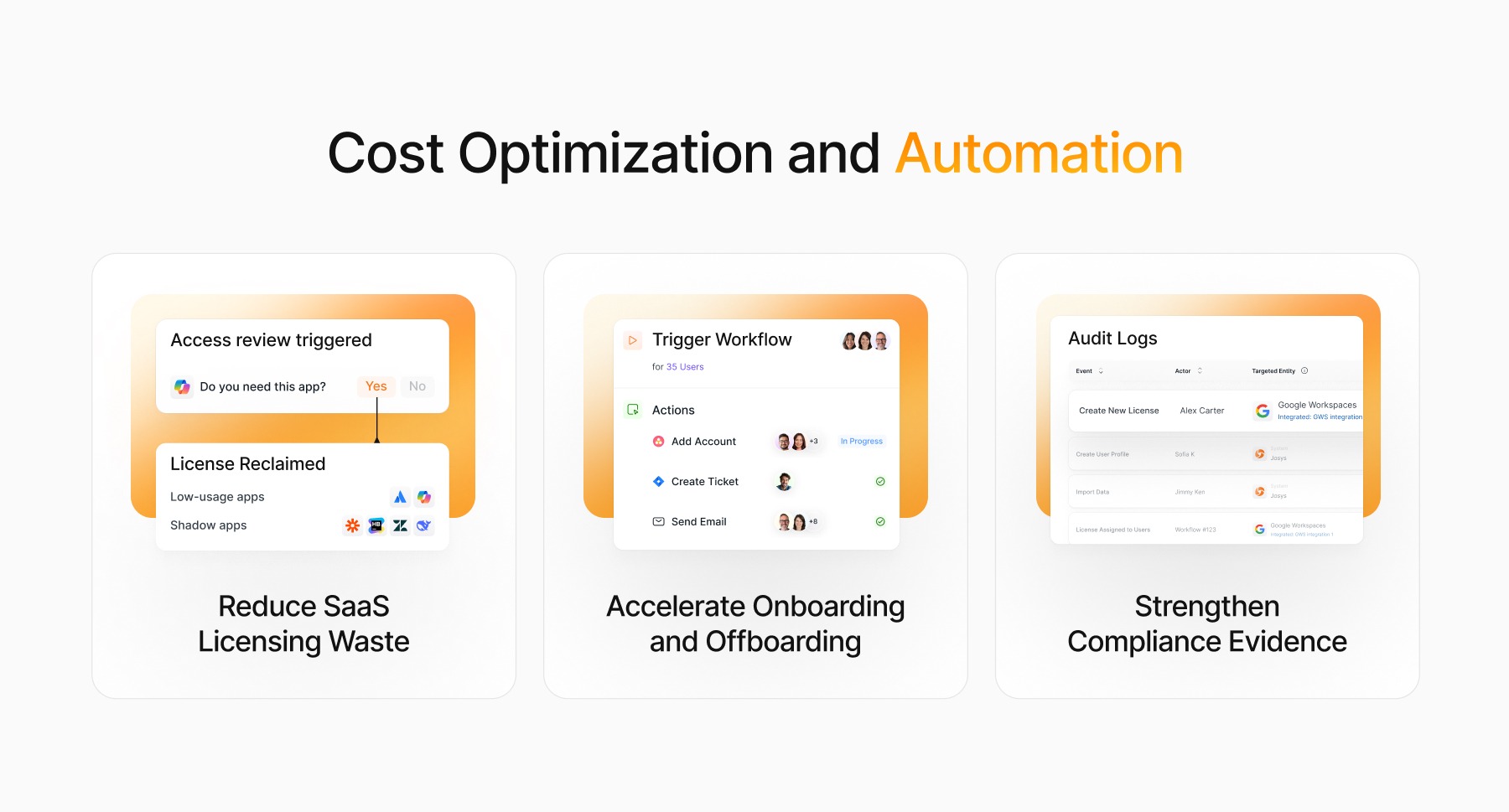
Benefits Beyond Security: Cost Optimization and Automation
Reduce SaaS Licensing Waste
Conditional access policies can help you identify inactive users and unused licenses. If someone hasn't logged into an app in 90 days, you can automatically revoke their access and reclaim the license. Over time, this adds up to significant cost savings, especially unused licenses for expensive SaaS tools like Salesforce or Adobe Creative Cloud.
Accelerate Onboarding and Offboarding
When a new hire joins, conditional access policies ensure they get the right level of access from day one, based on their role and device compliance. When someone leaves, policies can automatically revoke access across all apps, reducing the risk of orphaned accounts and data leakage. This automation eliminates manual steps and ensures consistency across your entire SaaS stack.
Strengthen Compliance Evidence
Auditors love conditional access policies. They provide clear, auditable evidence that you're consistently enforcing security controls. When you need to demonstrate compliance with SOC 2, ISO 27001, or GDPR, you can point to your conditional access logs and show exactly how access decisions are made and enforced. This reduces the time and effort required for compliance reporting.
Secure Access at Scale With Josys
Managing conditional access across dozens of SaaS apps is complex, time-consuming, and error-prone. Josys automates the entire process, from policy creation to enforcement to remediation, so you can secure your environment without adding headcount or manual overhead. Our autonomous platform continuously monitors your SaaS stack, identifies risky access patterns, and applies intelligent policies in real time. You get enterprise-grade security without the enterprise-grade complexity.
Request a Demo
See how Josys can help you deploy conditional access policies in minutes, not months. Book a demo today and discover how autonomous identity governance can transform your security posture while reducing costs and operational burden.
FAQs About Conditional Access Systems
How long does a conditional access system rollout take for most organizations?
For a basic deployment with a handful of core policies, expect 2–4 weeks. This includes planning, testing, and phased rollout. More complex environments with hundreds of apps, custom integrations, and legacy systems can take 3–6 months. The key is to start small, test thoroughly, and expand incrementally.
Can conditional access systems work alongside traditional VPN infrastructure?
Yes. Conditional access complements VPNs by adding context-aware controls on top of network-level security. You can require VPN access for certain apps or locations while using conditional access to enforce device compliance and MFA. Over time, many organizations shift away from VPNs entirely, 65% plan to replace VPN access, in favor of zero-trust architectures built on conditional access.
What metrics demonstrate the ROI of implementing a conditional access system?
Track reduction in security incidents, time saved on manual access reviews, and cost savings from reclaimed SaaS licenses. Also measure user productivity, conditional access should reduce friction, not increase it. If your help desk tickets related to access issues decrease, that's a strong indicator of ROI. Finally, look at compliance audit time: if you can close audits faster because your access controls are automated and auditable, that's real value.