This site uses third-party website tracking technologies to provide and continually improve our services, and to display advertisements according to users' interests. I agree and may revoke or change my consent at any time with effect for the future.
Mobile device management (MDM) software has evolved from a nice-to-have into a $20.44 billion market and a critical pillar of IT infrastructure. As workforces become increasingly distributed and 82% of organizations now permit employee-owned devices on corporate networks, IT teams are tasked with securing, managing, and optimizing devices they often can't physically touch. The challenge isn't just deploying MDM; it's choosing the right platform, integrating it into your broader governance stack, and extracting measurable ROI.
This guide covers the fundamentals of MDM, the features that matter most, what it actually costs, and how device management connects to the wider governance stack. Whether you're evaluating your first platform or migrating from a legacy system, you'll find frameworks you can apply directly.
Key Takeaways
What MDM is: a centralized platform for configuring, securing, monitoring and managing mobile devices - smartphones, tablets, laptops and IoT - regardless of location or ownership.
The features that matter: remote lock and wipe, zero-touch enrollment, policy-based app deployment, conditional access, real-time inventory.
Typical cost: $3–$10 per device per month. The usual hidden costs are onboarding fees, integration services and premium-tier feature gating.
MDM is not the whole picture: it manages devices already in service. Procurement, reassignment and retirement sit in device lifecycle management; desktops, servers and IoT sit in endpoint management.
What is mobile device management software (MDM software)?
Mobile device management software is a centralized platform that allows IT teams to configure, secure, monitor, and manage mobile devices across an organization, regardless of location or ownership model. MDM solutions provide remote control over smartphones, tablets, laptops, and even IoT devices, enabling IT to enforce security policies, deploy applications, and respond to threats in real time.
At its core, MDM addresses a fundamental tension: empowering employees with mobile flexibility while maintaining enterprise-grade security and compliance. Modern MDM platforms go beyond basic device tracking; they integrate with identity providers, conditional access engines, and SaaS management tools to create a unified governance layer.
For IT directors managing hybrid workforces, MDM is the connective tissue between endpoint security, identity management, and application control. It's not just about locking down devices; it's about creating a frictionless, secure experience that scales.
MDM vs EMM vs UEM: what the acronyms actually mean
These terms get used interchangeably in vendor marketing, but they describe different scopes - and the distinction matters during evaluation because it determines what you're actually buying.
MDM (mobile device management) manages the device: enrollment, configuration profiles, security policy, remote lock and wipe. Device-centric.
EMM (enterprise mobility management) wraps MDM and adds application management, content management and identity integration. Device plus app plus data.
UEM (unified endpoint management) extends the same control plane across every endpoint type - mobile, desktop, server, and increasingly IoT - under one console.
In practice most platforms sold today as "MDM" are functionally EMM or UEM. The useful evaluation question isn't which acronym the vendor claims, but whether the platform covers every device type you actually own and integrates with the identity provider you actually use. If your estate includes desktops and servers alongside phones, you're shopping forendpoint management, not MDM alone.
How MDM works across iOS, Android, Windows, and macOS
MDM platforms leverage native operating system APIs to manage devices without requiring invasive third-party agents. Here's how it works across major platforms:
iOS and iPadOS: Apple's Device Enrollment Program (DEP) and Apple Business Manager enable zero-touch enrollment. IT teams can configure devices over-the-air before employees ever power them on. Supervision mode unlocks advanced controls like app whitelisting and single-app kiosk mode.
Android: Android Enterprise (formerly Android for Work) provides a containerized work profile that separates corporate and personal data. IT can manage the work profile without touching personal apps or files. Zero-touch enrollment is supported for devices purchased from participating carriers.
Windows: Windows Autopilot integrates with Azure AD and Intune to streamline provisioning. Devices ship directly to employees and automatically enroll in MDM during the out-of-box experience. Group Policy Objects (GPOs) can be translated into modern MDM policies.
macOS: Automated Device Enrollment (ADE) ties devices to your MDM upon purchase. User-approved MDM enrollment ensures transparency, while FileVault integration enables remote encryption key escrow.
Cross-platform MDM solutions normalize these OS-specific mechanisms into a unified management console, allowing IT to apply consistent policies across device types.
Core MDM features IT teams need
Not all MDM platforms are created equal. Here are the non-negotiable features that separate enterprise-grade solutions from consumer-focused tools:
Remote lock and wipe
When a device is lost, stolen, or an employee departs, remote lock and wipe capabilities are your last line of defense. Modern MDM platforms allow IT to selectively wipe corporate data without touching personal files on BYOD devices. This granular control is critical for compliance with data protection regulations like GDPR and CCPA.
Zero-touch enrollment
Zero-touch enrollment eliminates the need for manual device setup. Devices are pre-configured and automatically enroll in MDM the moment they connect to the internet. This reduces IT overhead, accelerates onboarding, and ensures no device escapes governance. For distributed teams, it's the difference between shipping a ready-to-work laptop and fielding dozens of setup calls.
Policy-based app deployment
IT teams need the ability to push, update, and remove applications based on user role, department, or device type. Policy-based app deployment ensures employees have the tools they need without manual intervention. It also enables IT to blacklist risky apps and enforce approved software catalogs.
Conditional access controls
Conditional access ties device compliance to resource access. If a device falls out of compliance, say, it's jailbroken or missing a critical security patch, MDM can automatically revoke access to corporate email, cloud apps, or VPN. This dynamic enforcement model is a cornerstone of zero-trust security architectures.
Real-time inventory and reporting
Visibility is the foundation of control. MDM platforms should provide a real-time inventory of all managed devices, including OS version, installed apps, battery health, and compliance status. Advanced reporting dashboards surface trends, flag anomalies, and generate audit-ready documentation for compliance reviews.
What MDM doesn't cover: lifecycle and non-mobile endpoints
Two gaps are worth naming explicitly, because they're where most teams discover MDM alone isn't enough.
MDM manages devices that are already in service. It doesn't handle procurement, assignment, transfer between employees, repair, or retirement and disposal. Those stages are where most hardware cost and most compliance risk actually sit - a laptop never collected at offboarding is both a wasted asset and an open door. Device lifecycle management: from procurement to retirement covers that end-to-end process, including how to tie device state to employee state so nothing falls through the gaps.
MDM is mobile-first by design. Desktops, servers, virtual machines, IoT and specialized hardware need broader coverage. Endpoint management: securing every device, not just phones covers how endpoint management extends the same control plane across the full estate, and where it overlaps with MDM.
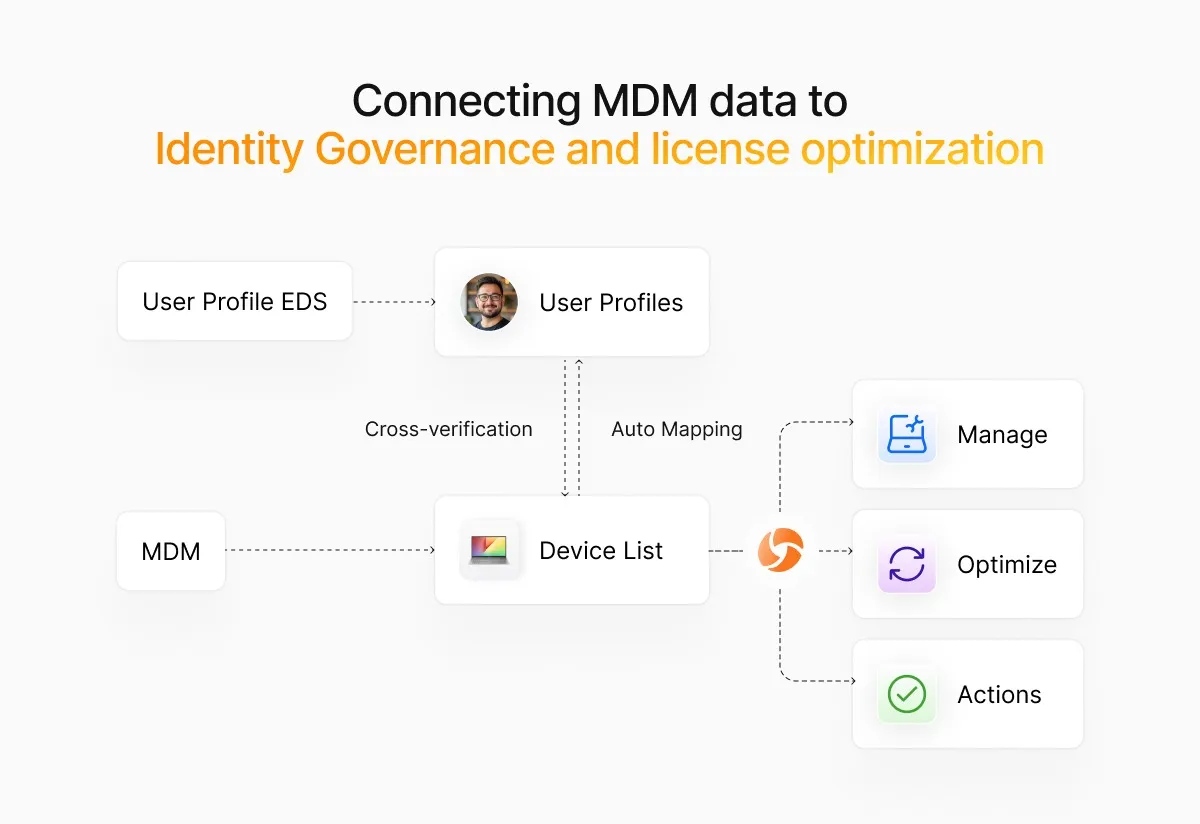
Connecting MDM data to identity governance and license optimization
MDM platforms generate a wealth of device and usage data, but that data often lives in a silo. Forward-thinking IT teams are connecting MDM telemetry to identity governance and SaaS management platforms to unlock automation and cost savings.
When a device falls out of compliance, an integrated system can automatically revoke SaaS licenses, disable SSO access and notify the user - no manual intervention. The same data informs license optimization by surfacing inactive devices and users who haven't logged in for 30 or more days.
There's a second, less obvious use. Device posture is an identity risk signal. A non-compliant laptop belonging to a user with broad administrative entitlements is a materially different risk from the same laptop belonging to a read-only user. Most organizations assess device compliance and identity risk in separate tools and never join the two, so the highest-risk combinations go unranked. Identity risk management covers how to score that combined exposure.
At Josys we've seen IT teams reduce SaaS spend by 15–20% simply by correlating device activity with application usage. If an employee's laptop hasn't connected in weeks, why are they still consuming a Salesforce seat? MDM data provides the signal; autonomous governance provides the action.
Benefits and ROI of mobile device management solutions
The business case for MDM extends far beyond security. Here are the tangible benefits IT Directors should measure:
Reduced onboarding time: Zero-touch enrollment cuts device provisioning from hours to minutes, freeing IT to focus on strategic initiatives.
Lower security incident costs: Remote wipe and conditional access prevent data breaches before they escalate. The average cost of a data breach is $4.45 million; MDM is cheap insurance.
Improved compliance posture: Automated reporting and audit trails simplify compliance with ISO 27001, SOC 2, HIPAA, and other frameworks.
SaaS license reclamation:By linking MDM data to SaaS usage, IT can quickly identify and reclaim unused licenses, often recovering 10–25% of software spend.
Increased employee productivity: Self-service portals and automated app deployment reduce support tickets and empower employees to work from anywhere, critical when nearly 80% of remote-capable employees now work hybrid or fully remote.
Calculate your MDM ROI by estimating time saved on device management, security incidents avoided, and licenses reclaimed. Most organizations see payback within 6–12 months.
How to evaluate and compare MDM tools
Choosing the right MDM platform requires a structured evaluation process. Here's what to prioritize:
Platform support checklist
Ensure the MDM solution supports all devices in your environment, including iOS, Android, Windows, macOS, and any specialized hardware such as rugged tablets or IoT devices. Verify support for the latest OS versions and backward compatibility for legacy systems you can't immediately retire.
Security certifications to demand
Look for certifications like SOC 2 Type II, ISO 27001, FedRAMP (if you're in the public sector), and GDPR compliance. These certifications signal that the vendor takes security seriously and has undergone independent audits.
Integration and API requirements
Your MDM platform should integrate seamlessly with your identity provider (Okta, Azure AD, Google Workspace), SIEM, and SaaS management tools. Robust APIs enable custom workflows and ensure MDM data flows into your broader IT ecosystem. Ask vendors for API documentation and example integrations during the evaluation phase.
Support and scalability factors
Evaluate the vendor's support model. Do they offer 24/7 assistance? What's the average response time for critical issues? Also, confirm the platform can scale as your organization grows. If you're managing 500 devices today but expect to reach 5,000 in two years, ensure the pricing and architecture can accommodate that growth without performance degradation.
Step-by-step migration from legacy MDM systems
Migrating from a legacy MDM platform is complex, but a phased approach minimizes disruption:
1. Audit existing devices and policies
Document every device, policy, and configuration in your current MDM. Identify which policies are actively enforced, which are outdated, and which devices are out of compliance. This audit becomes your migration baseline.
2. Map new compliance requirements
Regulations and security standards evolve. Before migrating, review your compliance obligations and map them to the new MDM's capabilities. This is your opportunity to tighten security posture, don't just replicate old policies.
3. Pilot zero-touch enrollment
Start with a pilot group of 20–50 devices. Test zero-touch enrollment, policy application, and app deployment in a controlled environment. Gather feedback from pilot users and iterate before rolling out organization-wide.
4. Automate offboarding of old agents
Once devices are successfully enrolled in the new MDM, automate the removal of old MDM agents. Use scripting or the new MDM's remote command features to uninstall legacy software and reclaim system resources.
5. Measure post-migration savings
Track metrics like time spent on device management, support ticket volume, and security incidents. Compare these to your pre-migration baseline to quantify ROI and demonstrate value to leadership.
Pricing models and hidden costs of MDM software
MDM pricing typically falls into one of three models:
Per-device, per-month: The most common model. Costs range from $3–$10 per device, depending on features and vendor.
Tiered plans: Vendors offer basic, standard, and enterprise tiers with escalating features. Be wary of feature lock; critical capabilities like conditional access may be gated behind premium tiers.
Bundled suites: Some vendors bundle MDM with endpoint detection and response (EDR), identity management, or SaaS security. Bundles can offer savings, but may include tools you don't need.
Watch for hidden costs: onboarding fees, professional services for complex integrations, overage charges for exceeding device limits, and premium support contracts. Always request a total cost of ownership (TCO) estimate for a three-year period.
Where MDM fits in a unified governance stack
MDM is powerful but partial. The next step is autonomous governance — connecting device management, identity lifecycle and SaaS optimization into one self-healing system.
Consider the sequence: a laptop fails a compliance check. Within seconds the system revokes access to sensitive SaaS applications, notifies IT and triggers remediation. When the device is compliant again, access restores automatically.
Josys unifies device data with SaaS usage, identity governance and license optimization, giving IT one view across devices, apps and users. You can see how the device and identity layers connect on the identity security and risk solution page, or book a demo.
Frequently asked questions about mobile device management software
What is the difference between MDM and UEM?
MDM manages the device - enrollment, configuration, security policy, remote wipe. UEM extends that control plane across every endpoint type including desktops, servers and IoT, and usually adds application and identity management. Most platforms marketed as MDM today are functionally UEM. The practical test is whether the tool covers all the device types you own.
How much does MDM software cost?
Most vendors charge $3–$10 per device per month depending on feature tier. Budget separately for onboarding, professional services for integrations, and premium support. Request a three-year total cost of ownership figure rather than comparing list prices — tier gating and overage charges are where budgets break.
Does MDM work on personal (BYOD) devices?
Yes. Android Enterprise work profiles and Apple's user-enrollment mode create a managed container separating corporate from personal data. IT can enforce policy on and selectively wipe the corporate container without accessing personal apps, photos or messages — both a privacy requirement and, in many jurisdictions, a legal one.
What is the difference between MDM and device lifecycle management?
MDM manages devices that are already deployed and in service. Device lifecycle management covers the full arc - procurement, provisioning, assignment, reassignment, repair, and retirement or disposal. MDM is one stage within the lifecycle; lifecycle management is the process that surrounds it, and it's where hardware cost and offboarding risk actually concentrate.
Can access be revoked automatically when a device is out of compliance?
Yes. Governance platforms monitor compliance continuously and automatically revoke access to SaaS applications, email or VPN when a device drifts out of policy, using conditional access rules and identity provider integrations. Access restores automatically once remediated.
How does device compliance relate to identity risk?
Device posture is one input into overall identity risk. The same non-compliant device represents very different exposure depending on what the user can reach — an administrator on a non-compliant laptop is a far higher priority than a read-only user on the same device. Scoring the combination rather than each signal separately is what identity risk management addresses.