

End-to-End Access Management Using Josys Workflows
Join hundreds of companies and start your identity governance journey today
Every time someone joins, leaves, or changes roles, IT admins face the same grind when managing access. Someone joins your company, and suddenly you're hopping between Slack, Zoom, Salesforce, and Google Workspace - setting up access in each one, creating accounts, assigning the right licenses, and hoping you didn't miss anything.
When someone leaves, it's the same in reverse, except now you're concerned about the accounts you forgot to deactivate and the associated security risks. In fact, according to a recent study, 89% of former employees still retain access to at least one application from their previous employer.
What does this mean? Managing access is tedious, it's error-prone, and honestly, it doesn't scale when you're managing dozens or hundreds of employees across a growing tech stack and varying functions.
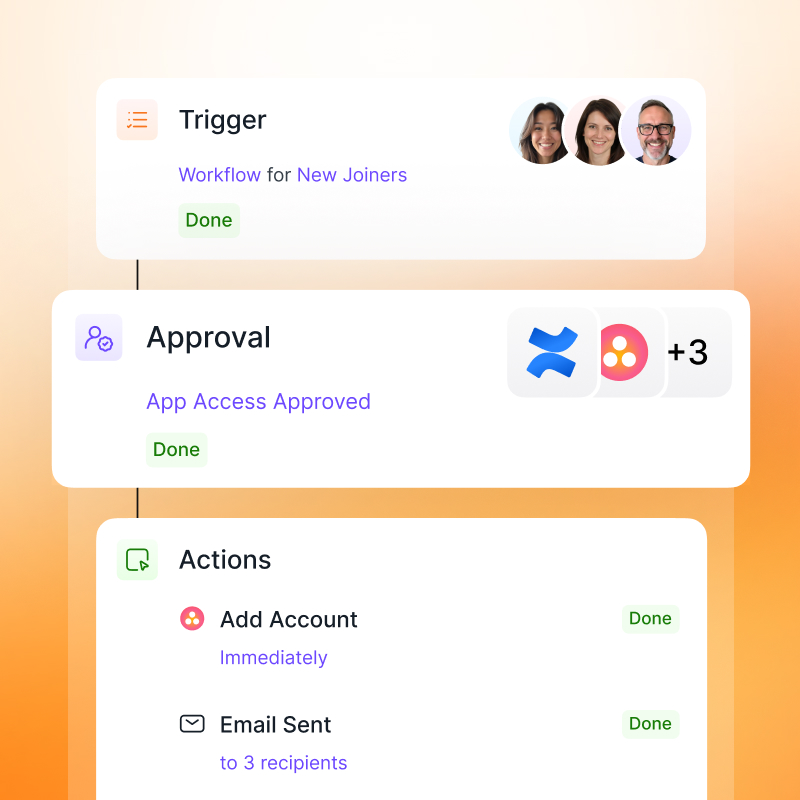
Josys Workflows fixes this by giving you a simple, repeatable structure: Trigger → App -> Condition → Action.
What is a workflow?
A workflow is designed to automate actions or tasks from start to finish. In access management, this means eliminating the manual process of updating user access across dozens or hundreds of applications when someone joins, leaves, or changes roles. This systematic approach ensures full control over access management, adapts to your existing tech stack, and fills the gaps between your various systems.
Access management workflows based on use cases
Building workflows from the ground up takes time, and most IT teams are dealing with the same core scenarios: onboarding, offboarding, access reviews, license management. So we created a set of ready-to-use templates that automate the most common use cases. You can deploy them as-is or customize them to fit how your team actually works.
- Offboarding: Revokes access across all connected apps right away, so nothing slips through the cracks
- Onboarding: Gets new hires set up with the apps they need before their first day even starts
- Shadow user management: Surfaces accounts and apps that exist outside of IT's control, so you know what you're dealing with
- License optimization: Tracks usage and helps you reclaim seats that aren't being used, cutting unnecessary costs
- Access requests: Handles the full lifecycle of app requests with approvals and compliance checks built in
- Access reviews: Takes actions based on the response received from the reviewer.
Here's how it works
Step 1: Triggering your workflow
Triggers are events that kick off your workflow, and you have a lot of flexibility here. It could be a status change when someone's employment status updates, a specific start date for a new hire, or an update to user attributes like their location, department, or job title.
Josys supports two additional modes of triggering workflows:
- Webhooks help you invoke workflows directly based on any changes in your active directory like Okta or SAP , or from your internal ITSM and. HRMS.
- Manual triggers give you the ability to test workflows without affecting your entire organization, or run workflows for specific people for exceptions like an emergency offboarding, or re-run workflows that failed the first time around
Step 2: Selecting the applications
Apps allow you to choose the SaaS apps where the current workflow will be triggered. This is the core of how Josys connects to your stack.
Josys has over 350 native integrations that let you manage access, remove licenses, and trigger changes across the tools your team actually uses. And for apps that aren't on that list, our AI integration builder can connect to virtually any application, even ones that don't have a traditional API. That means you're not limited by what's officially supported - if it's part of your stack, you can bring it into the workflow.
Step 3: Setting the conditions
Condition is where you narrow things down, allowing you to filter based on department, location, or app category so the workflow only applies to the right set of people.
Step 4: And action
Action is what actually happens once the workflow runs.
You can:
- Grant or revoke access to specific apps
- Create a Jira ticket for follow-up tasks
- Send an email notification
- or fire off an HTTP request.
You are able to fire an HTTP request to any tool with a REST API. This means you can create tickets in ServiceNow, send messages to Slack, update records in Zendesk, or whatever your process requires.
Your setup, your way
Your tools and processes aren't like anyone else's, and that's exactly why Josys Workflows is built the way it is. It adapts to your stack, fills the gaps between systems, and gives you full control over how access management works in your organization.
See how it works. Sign up now or book a demo and we'll show you how it fits into what you're already running.
over your identities, applications, and files?
Sign-up for a 14-day free trial and transform your IT operations.




Questions? Answers.




What is Josys?

End-to-End Identity
Governance made easy for IT


